Pay transparency.
From the HR system, not from spreadsheets.
Salary ranges in job ads, job categories, pay and benefit data, information requests with a two-month deadline and a gender pay gap report — where your employee data already lives.
Where does regulation stand?
The directive
EU 2023/970. Member states had to transpose it by 7 June 2026.
Reporting
Under the directive: above 250 employees yearly, first in 2027 (for 2026); 150–249 every three years from 2027; 100–149 every three years from 2031.
Regardless of size
Telling applicants the starting pay or its range, and employees’ right to request information, apply to every employer under the directive.
Joint pay assessment
If a category shows a gap of 5% or more that objective criteria do not explain, and it is not remedied within six months.
National law
The national transposition sets the report format and the details. That is why the threshold, the smallest reportable group and the response deadline are configurable.
This page is not legal advice. Status: November 2026.
What the directive asks for, and where it lives in the system.
Eight obligations, each with its place — not in a separate spreadsheet, but in recruiting, in documents and next to employee data.
-
Art. 5
Recruiting
Pay range for applicants
The position’s salary range appears in the job ad and on the careers page. You can require a range before an ad can be published.
-
Art. 5
Recruiting
No questions about previous pay
The application form asks for salary expectations, never previous pay.
-
Art. 4
Job categories
Work of equal value
Job categories based on four criteria, with a score and a suggested category. HR decides; any deviation from the suggestion is logged with a reason.
-
Art. 6
oneDox
Pay criteria for employees
The “pay and progression policy” template follows the directive’s structure. Roll it out, collect acceptance, and see who has not accepted yet.
-
Art. 7
Pay and benefits
Information within two months
The employee requests it with one button; HR sees the deadline. The answer shows their own pay and the category’s average and median by gender.
-
Art. 7
HR Outbox
Yearly reminder of the right
A yearly notice on the home screen and by email; delivery is logged.
-
Art. 9
Pay gap report
Pay gap report
Mean and median; base pay, variable pay and benefits separately; share of recipients, quartiles, per category. The final version as PDF.
-
Art. 10
Pay gap report
Joint pay assessment
A gap of 5% or more without a reason turns red. One click opens a case: review, consultation with employee representatives, action plan with owner and deadline.
You see where the gap is, and what causes it.
Mean and median by gender; base pay, variable pay and benefits separately, per category. Where the gap reaches 5% and no objective reason is recorded, the row turns red.
Above 5% with no recorded reason: a red row — one click opens a case.

All three are configurable. While data is missing (base pay, gender, category), the report is “preliminary” and lists whose data is missing. One click turns the report into two texts: an employee notice with aggregate figures and no individual pay, and a management summary with the groups above the threshold and the next steps — both can be rewritten.
Pay is more than base pay.
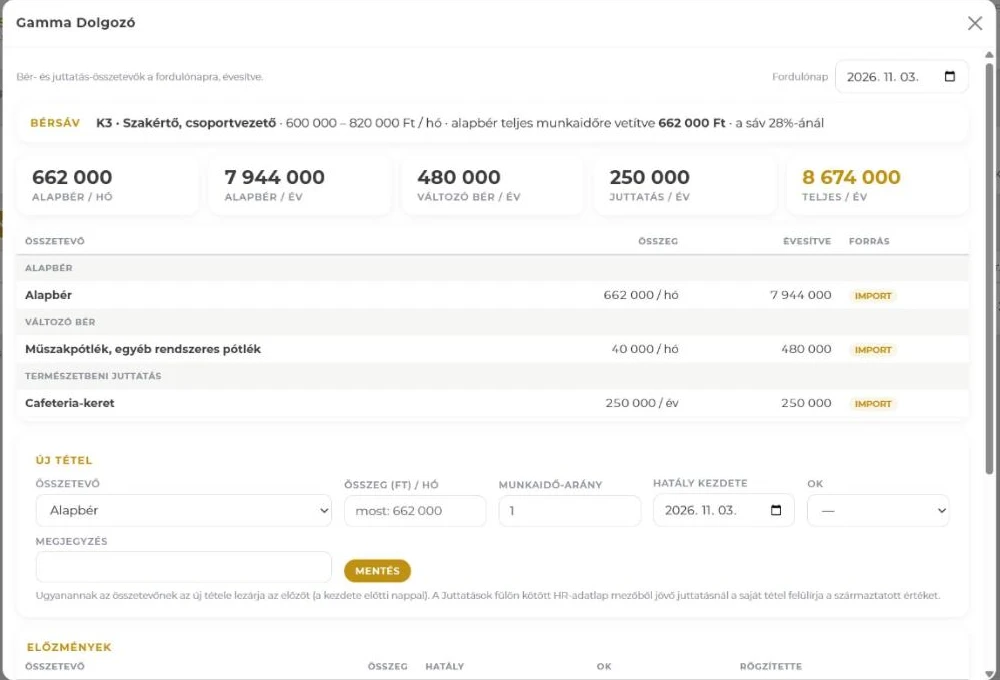
The report works with total remuneration. Every item has a validity date, annualised and scaled to full time.
Base pay
Monthly gross with working-time ratio. This is what the system compares with the category’s salary range — for a new joiner’s pay too: if it falls outside the range, it asks for an objective criterion.
Variable pay
Bonus, commission, shift allowance and other regular allowances.
Benefits in kind
Cafeteria, meal and leisure cards, private use of company car and phone, language course, housing support, insurance — with unit prices.
Import
From your payroll export (xlsx, csv). Columns map by header; the preview shows what is new and what changes.
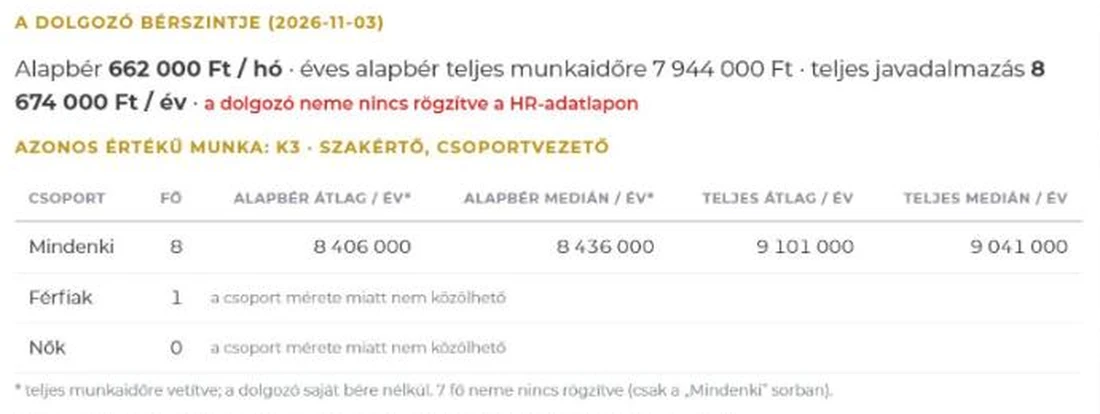
When an employee asks, the answer is ready.
Information requests must be answered within two months. The system calculates what goes into the answer; HR checks and sends it.
Request
The employee requests it with one button on their own Pay tab. HR records requests made verbally or on paper on their behalf.
Deadline
The request list shows the time left; HR Now flags it 10 days before and at the deadline.
Answer
Their own pay and the job category’s average and median by gender. For groups smaller than three: “not reportable due to group size” instead of a number. The cover letter drafts itself from this, with the category’s salary range and — if you recorded them — the criteria of the latest pay rise; alongside, only HR sees what to prepare for (pay outside the range, a gap above 5%, missing data). The draft can be rewritten.
Send
A PDF goes into the employee’s documents and by email. The answer is logged as a pay view.
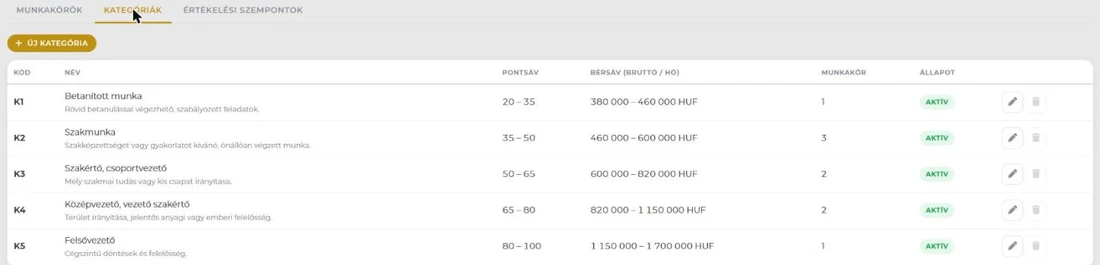
What counts as work of equal value?
The system suggests, HR decides. The category carries the salary range, so the job ad, the employee and the report look at the same range.
Evaluation
Four criteria (skills, effort, responsibility, working conditions) from 1 to 5. Criteria, scale and weights can be tailored to the company.
Suggestion
The score falls into a category’s point range — that is the suggestion. A deviation needs a reason; every change is logged.
Salary range
If a position’s range falls outside its category’s, recruiting warns. If an employee’s base pay falls outside, it can be tracked as a case with owner and deadline.
Haver
If enabled, it suggests scores from the job description, with a reason per criterion. HR decides.
No more pay review spreadsheets sent round by email.
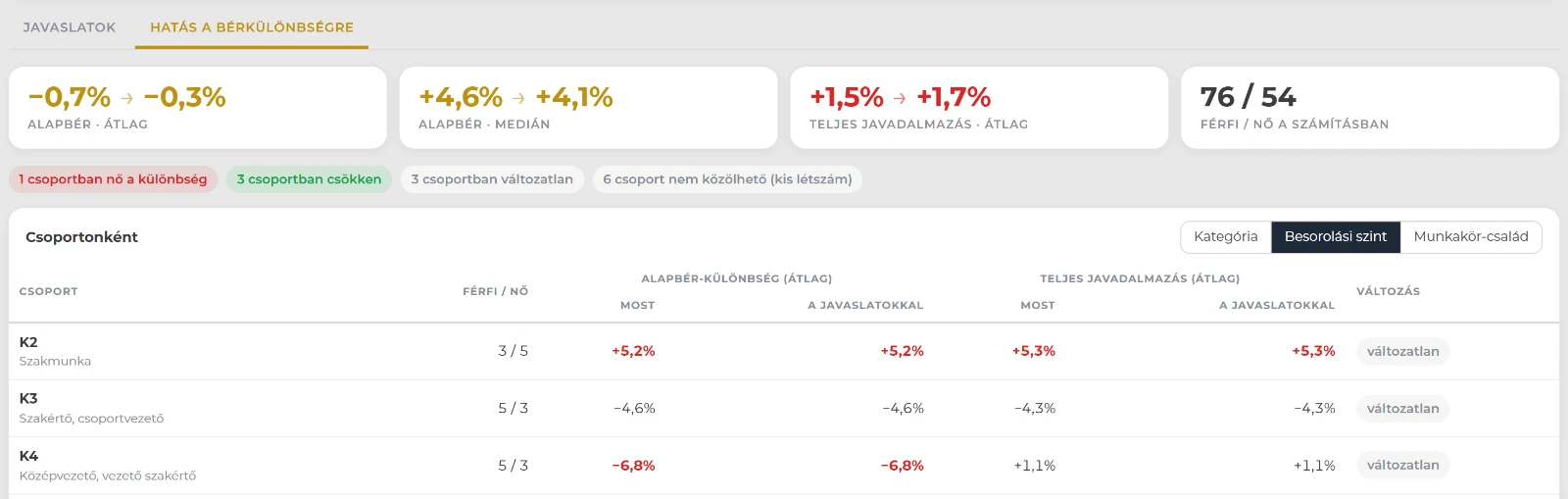
The pay review round uses the same categories, salary ranges and pay gap calculation as the report. Next to each proposal you see the range, the last change, the evaluation and the budget — and before you close it, you see what the round does to the gap between women and men.
Open the round
Effective date, budget in per cent or in forints (as a share of base pay or total pay), and who is in it: organisational unit, job category.
Proposals
Row by row or for several people at once: a rise in per cent or in forints, bringing pay up to the bottom of the range, or filling in from the company’s own proposal matrix — for base pay and for the benefits added to the round. The budget stays in view throughout.
Impact
The gap between women and men without the round and with the proposals, group by group — using the same calculation as the gender pay gap report.
Close
Warnings (out of range, over budget, missing justification) ask for a review; they do not block. On closing, the new pay goes into the pay records from the effective date, with the reason, and the changed rows go to payroll in Excel.
Notice
One PDF per employee, among their documents. The email only says a new document has arrived; it contains no amount.
The proposal matrix is the company’s own rule, not artificial intelligence: any row can be changed. Only pay editors see the round.
What justifies the rise?
Every rise gets an objective criterion, so you can see later what each decision was based on.
Criteria
Skills, effort, responsibility, working conditions, performance, experience — one click each, more than one allowed. In the round and for a new entry on the Pay tab alike.
Missing justification
If a decision has no criterion, or a market adjustment has no source, the row flags it, a filter collects them, and the “Pay rises without justification” report exports them to Excel.
HR Now
Flags when an open round’s effective date is near, or when a pay rise has no justification.
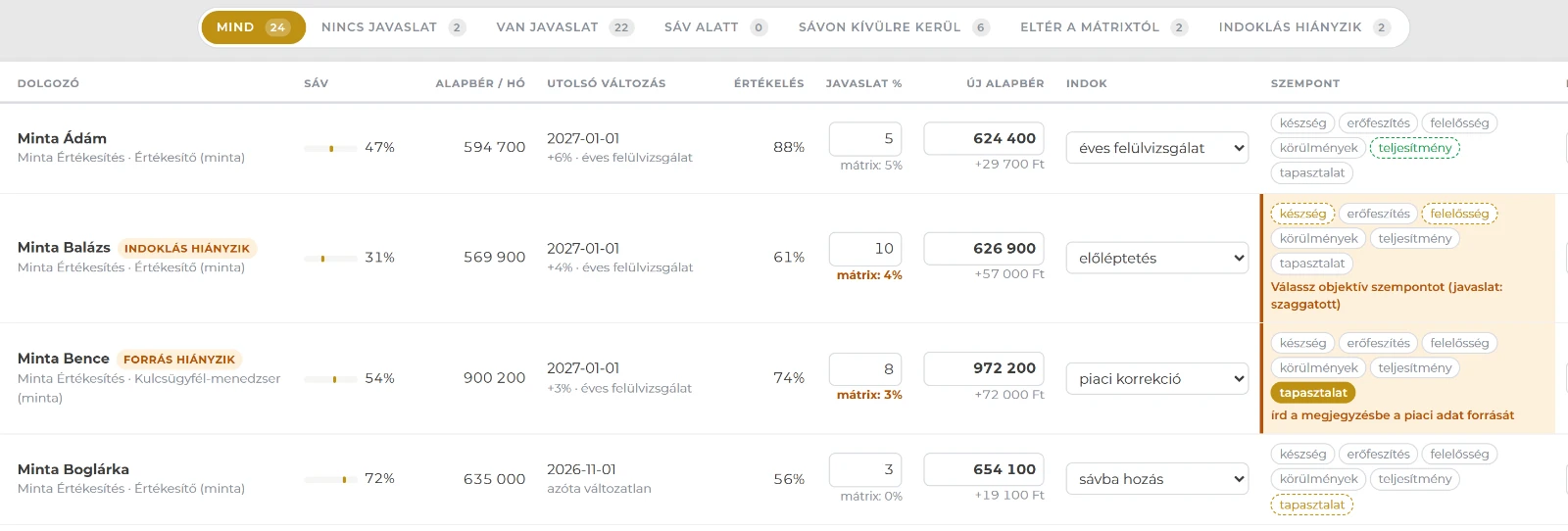
A criterion describes the decision; it does not explain the pay gap.
Who sees pay data?
- Separate permissions for viewing and for recording.
- Every view is logged; the employee’s Pay tab shows who looked.
- Employees see their own pay.
- Neither the answer nor the report shows another employee’s individual pay.
- The module is switched on separately; it is off by default.
Where to start now?
Under the directive, companies above 250 employees report first in 2027, covering 2026. The data has to be in order by then.
Classify jobs
Categories and point ranges; the starter set has five categories.
Salary ranges
For categories and open positions — job ads take it from here.
Pay and benefit data
Import from payroll, and gender on the HR record.
Policy
Roll out the pay and progression policy and collect acceptance.
Trial report
Where data is still missing, and where a gap above 5% has no objective reason yet.
Where it lives in the system
Frequently asked questions
When do we have to report the gender pay gap?
Under the directive, employers with more than 250 employees report yearly, first in 2027 (for 2026); those with 150–249 every three years, also from 2027; those with 100–149 every three years from 2031. The exact national rules come from the national transposition.
Does the system make us compliant?
The system is a compliance tool: it collects the data, calculates the indicators, watches the deadlines and keeps a log. Compliance comes from the employer’s decisions — classification, reasons, answers. It does not give legal advice.
Do we need new payroll software?
No. Pay and benefit data can be loaded from your existing payroll export (xlsx or csv). Columns map by header, so the next export fits too.
What counts as pay?
Base pay, variable pay (bonus, commission, allowances) and benefits in kind (such as cafeteria, company car, phone) — annualised and scaled to full time. The report also shows all three separately.
What if a group is too small?
If fewer than three employees of one gender are in a group, “not reportable” appears instead of a number, both in the answer and in the report. The threshold is configurable.
Does AI help?
If Haver is enabled, it suggests scores from the job description, and summarises from the report’s aggregate figures what may cause the gap. No individual pay goes to the model; HR decides.
Can we plan pay rises in it too?
Yes. The pay review round builds on the salary ranges and the pay gap calculation: effective date and budget, proposals per employee or for several at once, and the impact on the pay gap before closing. On closing, the new pay goes into the records, payroll gets an Excel file and each employee a PDF notice. Only pay editors see the round.
Can it be added to an existing system?
Yes. Pay transparency is a separate module: off by default, and it can be switched on in the existing system, next to the employee data.
Let’s talk about where you stand.
A trial report shows where data is still missing, and which gaps still need a reason.